Annie Baby Monitor: Nanny Cam
- 4.3
- Rating
- 500.00K
- Installs
- Free
- Price

 Analysis by App-foxy
When I look at a baby monitor, I am not only asking whether it can transmit sound or video. I also want to know how much control I have, what I must configure before relying on it, and whether the app fits the way my family actually moves through a home. Annie Baby Monitor: Nanny Cam is a parenting app from Master App Solutions that combines monitoring with baby-tracking tools. I found its appeal strongest for parents who want to use phones they already own rather than buy a separate camera system.
The app is free to install, is rated for Everyone, and has reached more than half a million installs. Its average score is 4.3 from roughly fifteen hundred ratings, which suggests that many families find the basic idea useful, while also leaving enough room for individual experiences to vary. The current version is 5.42, and it works on Android 8.0 or later. Those details matter because a monitor is only helpful when it runs reliably on the devices available in the nursery and with the parent who is checking in.
What trust means when a phone becomes a baby monitor
Turning two phones into a monitoring setup is convenient, but it changes the trust question compared with buying a dedicated audio monitor. A dedicated unit normally has one clear purpose. With a phone-based app, the device may also receive calls, notifications, updates, and other interruptions. In my view, Annie Baby Monitor makes the most sense when parents treat setup as part of the safety routine rather than simply pressing a start button and walking away.
You May Also Like

 Blood Strike: 2.5 Anniversary
Blood Strike’s Loadouts Turn Every Drop Into a Tactical Gamble
A close look at Blood Strike’s custom loadouts: how fast access to signature weapons reshapes its battle royale rhythm, rewards preparation, and narrows the gap between fights.

 Pandora - Music & Podcasts
Pandora’s Music Is Easy to Start, but Harder to Recover
Pandora’s strength is its low-effort path from a seed to a station. Its weak spot is how much confidence it asks you to place in connection, setup, and quiet recovery.

 8 Ball Pool
 Is Built on Rivalries, Rematches, and Routine
A close look at the rivalries, rematches, shared routines, and unanswered safety questions that turn a quick pool match into a persistent mobile community.

 Samsung Music
’s Quiet Strength Is Playing What You Already Own
Its reach comes less from spectacle than from dependable access to a personal library. That simplicity is both the app’s strongest retention engine and its ceiling.

 AccuWeather: Weather Radar
AccuWeather Review: A Quick, Clear Forecast for Everyday Decisions
For everyday plans, the best forecast is the one you can understand quickly. AccuWeather makes rain timing, radar, and local conditions easy to act on, with a few trade-offs.

 Hill Climb Racing
Why Hill Climb Racing Still Turns Crashes Into One More Run
A tiny car, a bumpy hill and one more upgrade: Hill Climb Racing keeps resurfacing because its simple chaos makes every near-miss feel personal.
More From Our News Desk



I would begin by deciding which phone stays with the baby and which one stays with the adult. That sounds obvious, but it prevents a common mistake: using an older phone with a weak battery, a damaged charging port, or an unstable connection. The nursery device should be positioned securely, connected to power in a sensible way, and kept where a child cannot pull it down. The adult device should be tested from the places where monitoring will actually happen, such as the kitchen, garden, or a bedroom at the other end of the home.
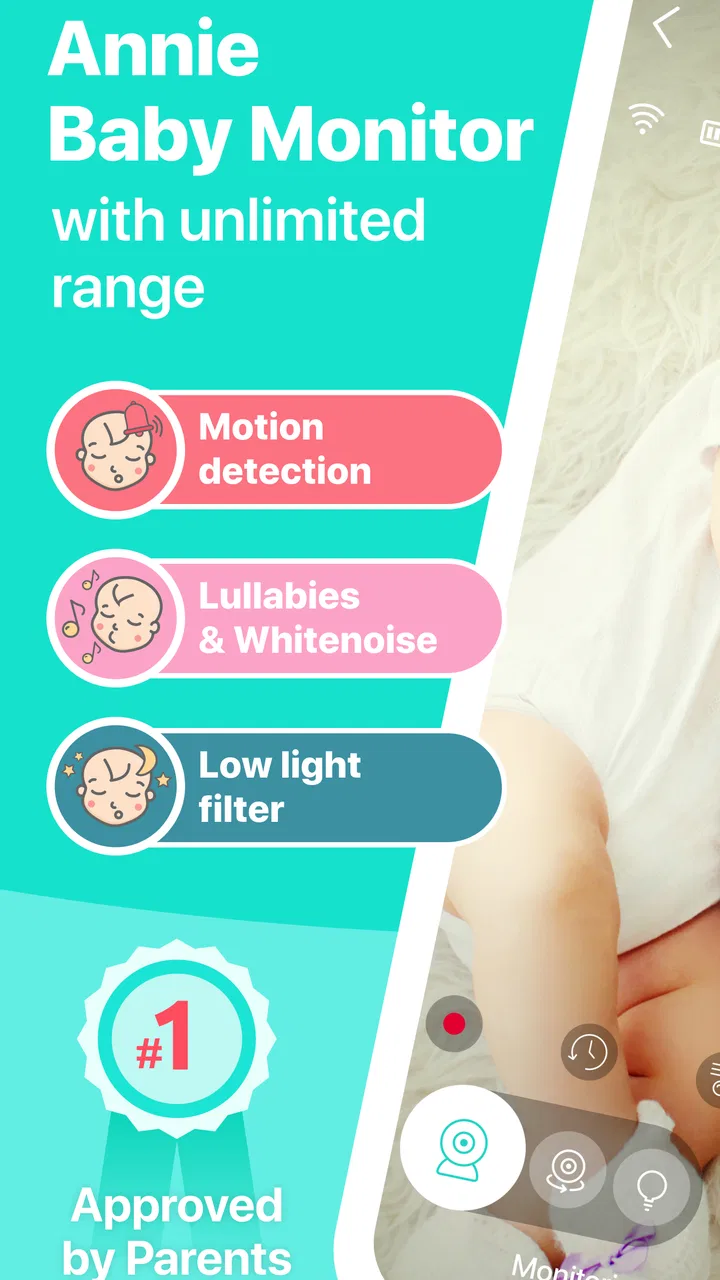
The app’s promise of unlimited range is most useful when understood as freedom from the short radio distance of traditional monitors. It does not remove the need for a working connection between the devices. That distinction is important in a basement, a holiday rental, or a home with unreliable internet. I would test the complete route before nap time instead of assuming that a phone-based connection will behave like a dedicated local monitor.
There is also a practical trust issue around false confidence. A live feed can make a parent feel covered, but it does not replace checking the room, listening in person when appropriate, or following safe-sleep guidance. I see this app as an extra set of eyes and ears, not as a guarantee that every sound or event will be noticed. That mindset is especially important during overnight use, when a parent may be tired and a phone may be muted, charging, or handling another task.
Setting up a dependable everyday routine
My preferred workflow would be simple: charge both phones, open the monitoring session, confirm that the parent device receives the expected audio or visual information, and then lock the nursery arrangement in place. I would also make a short test from the farthest regular location in the home. Testing at close range can hide connection problems that appear later.
A useful habit is to keep the nursery phone dedicated to monitoring while it is in use. Avoiding unrelated activity reduces the chance of an accidental interruption. I would also check the screen orientation, brightness, and notification behavior before bedtime, because a setup that is technically connected may still be awkward to use in a dark room.
Another non-obvious trade-off is battery management. A phone acting as the baby-side unit may consume power continuously, especially if the session uses the camera. Keeping it plugged in is practical, but cables and chargers must be arranged well away from the crib and out of reach. If the device becomes warm, I would move it farther from bedding and furniture and reconsider whether that particular phone is suitable for long sessions.
The app’s baby-tracker role can also change how parents use it. Instead of opening a monitor only when a child is asleep, a parent may use the same app as part of a broader daily routine. That can be helpful for remembering care events, but it can also create extra input work when the parent is busy. I would only record information that I genuinely expect to use later; a tracker becomes less useful when it turns into a second chore.
Controls and choices I would check first
Because this is a monitoring tool, I would pay close attention to every visible choice during setup: which device acts as the child-side unit, which device receives the session, whether audio or video is active, and what alerts are enabled. These choices affect both convenience and privacy. I would not leave settings at their initial state without understanding what the app is asking the phones to do.
When an app uses a phone microphone or camera, I expect the operating system to show permission prompts. I would read those prompts carefully and grant only what is needed for the function I intend to use. If I only need sound for a particular nap, I would avoid enabling a camera mode unnecessarily. If I stop using the monitor, I would review the phone’s system permissions and remove access that I no longer want active.
I would also look for account and session controls before sharing access with another caregiver. A babysitter, grandparent, or co-parent may need to participate, but the safest approach is to understand exactly how access is granted and how it can later be ended. I would not casually pass around a primary phone or leave an active session open on a shared device. The important question is not only “can someone connect?” but also “can I clearly stop that connection?”
The free cost lowers the barrier to trying it, but the app includes optional purchases ranging from forty-nine cents to nearly eighty-four dollars per item. I would inspect the purchase screen before confirming anything, especially if a child might handle the device. A free download does not mean every function is free, so I would identify which tools are available without payment and whether an upgrade is genuinely useful for my routine.
For families with children using the same phone, purchase controls deserve particular attention. I would use the operating system’s purchase authentication and avoid leaving a payment method exposed during ordinary monitoring. This is a small step, but it prevents a parenting utility from becoming an accidental source of spending.
Privacy-sensitive moments in real family life
The most sensitive moment is obvious: a phone in a child’s room may capture private household sounds or images. I would treat the nursery device as an active sensor whenever monitoring is running. That means telling other adults in the home, avoiding unnecessary use in changing areas, and ending the session when monitoring is no longer needed.
There are less obvious moments too. A parent may carry the receiving phone into a conversation with visitors, a medical appointment, or a work call while the nursery session remains active. Even if the app is behaving as intended, the surrounding context can make the feed uncomfortable or inappropriate. I would pause monitoring before entering situations where other people could be heard or seen without expecting it.
Travel creates another useful test. In a hotel or relative’s home, the room layout, network quality, and charging position may differ from normal. I would set up a short trial before putting a child down, and I would avoid assuming that a familiar home routine automatically transfers to a different network. A separate audio monitor may be the better choice for travel if simplicity and local operation matter more than phone access.
Shared caregiving also requires clear boundaries. If two adults use the app, I would agree on who is responsible for responding to an alert and who will end the session. Without that agreement, both people may assume the other is watching. The technology can connect caregivers, but it cannot resolve unclear responsibility.
For older children, the privacy balance changes again. A baby may not understand monitoring, while a toddler or school-age child may begin to notice the camera or microphone. I would explain the purpose in age-appropriate language and avoid using monitoring as a way to observe every private moment. The app is easier to justify for sleep and immediate care than for constant surveillance.
Where the app gives parents real agency
I like the flexibility of using existing phones because it lets a family decide how much equipment to keep at home. If a spare device is available, the app can be a practical way to try phone-based monitoring without first buying a dedicated camera. It is also easier to move the receiving phone around the house than to install a fixed parent unit.
The baby-tracking side may be valuable for parents who want monitoring and routine notes in one place. I would use it selectively: record details that help identify patterns, such as when a child usually settles or wakes, rather than attempting to document every minute. The benefit comes from useful consistency, not from creating a perfect diary.
One of my favorite practical ideas is to create a pre-sleep checklist around the app rather than relying on memory. Confirm the nursery phone is powered, the receiving phone has an audible alert, the session is active, and the device is positioned safely. This makes the app part of a repeatable routine and reduces the chance that a parent mistakes an open screen for a functioning monitor.
Another helpful choice is deciding in advance when video is unnecessary. Audio can be enough for a sleeping child, while video may be useful when checking position or the room. Using the least intrusive mode that meets the need can reduce distraction and make privacy easier to manage. I would not assume that more information is always better information.
The app is also a reasonable fallback when a dedicated monitor fails, provided the phones and connection are ready. I would not wait until an emergency to discover that an old handset cannot stay powered or that the home network does not reach a particular room. A monthly test is sensible for families who keep it as a backup.
How it compares with ordinary alternatives
Compared with a traditional audio monitor, Annie Baby Monitor offers more flexibility because the parent side can be a phone already carried around the home. The trade-off is that phones are general-purpose devices. Calls, battery limits, system updates, and notifications can all complicate a task that dedicated hardware handles more narrowly.
Compared with a dedicated video monitor, the app may be cheaper to try and easier to relocate, but it depends more heavily on the phones and connection. A dedicated camera can be the better fit for parents who want a permanent nursery installation, a separate screen, or a system that does not involve their personal handset. I would choose dedicated hardware when the monitor must remain available every night with minimal setup.
Compared with simply calling the nursery phone, the app is more purpose-built for parenting because it combines monitoring with tracking. A phone call may be enough for occasional audio, but it does not provide the same focused workflow. On the other hand, a basic call can be preferable for a one-time situation when installing and configuring another app would add unnecessary complexity.
Compared with a cloud-centered smart-camera system, a phone-based approach may feel more direct because the family controls the devices used for the session. Still, I would not make assumptions about data handling, storage, or transmission without reading the app’s current privacy information and the operating system’s permission screens. Trust should come from visible controls and informed choices, not from the app’s category alone.
Who should use it, and who should pass
I would recommend trying it to parents who have two suitable phones, want a flexible monitor for naps or evenings, and are comfortable checking permissions and connection behavior. It is particularly practical for a temporary nursery, a visit to relatives, or a family that wants to test phone-based monitoring before investing in dedicated equipment.
I would be more cautious for parents who need a monitor that works independently of household internet, who cannot keep a phone safely powered for long sessions, or who want a dedicated screen with no other notifications competing for attention. In those cases, a conventional monitor may be less flexible but more predictable.
I would also skip it as the sole monitoring method if the family cannot establish a clear response routine. No app can compensate for an adult who is asleep with the receiving device muted, or for a nursery phone placed where its microphone or camera is blocked. The technology is only one part of the arrangement.
Families should also consider whether in-app purchases fit their budget and expectations. Since optional items can range from a very small amount to nearly eighty-four dollars, I would review each purchase carefully rather than assuming that paying is necessary for basic use. The right decision depends on the functions a household actually needs, not on the existence of an upgrade screen.
My cautious verdict after weighing the trade-offs
Annie Baby Monitor: Nanny Cam is a sensible option for parents who value flexibility and already have spare phones available. I appreciate the combination of monitoring and baby tracking, and the free starting point makes it easier to explore without immediately buying hardware. Its broad device reach and established user base also make it worth considering for everyday family routines.
My recommendation comes with conditions. I would test the connection from real locations, keep the nursery phone secure and powered, review microphone and camera permissions, protect purchases, and end sessions when they are no longer needed. I would also read the current privacy information and use the app’s visible controls as the basis for deciding what feels acceptable in my home.
The strongest reason to choose this app is control over a flexible phone-based setup; the strongest reason to avoid it is dependence on phones, connectivity, and careful supervision. For a family that understands that balance, it can be a useful parenting companion rather than just another live feed. For parents seeking a self-contained, always-ready monitor, dedicated hardware remains the calmer choice.
FAQs for Annie Baby Monitor: Nanny Cam
01How does Annie Baby Monitor ensure the safety and privacy of my baby’s data?
Annie Baby Monitor takes privacy seriously by using encrypted connections to ensure that all audio and video streams are secure. The app does not store any data on its servers, meaning your child's data stays private and only available to you. It's important to ensure both devices have strong passwords for added security.
02Can Annie Baby Monitor work with any type of internet connection?
Yes, Annie Baby Monitor is designed to work seamlessly over Wi-Fi, 3G, 4G, and even 5G connections. This flexibility allows you to monitor your baby from virtually anywhere. However, the quality of the video and audio may vary depending on the strength and stability of your internet connection.
03Is it possible to monitor multiple children or rooms using Annie Baby Monitor?
Absolutely! Annie Baby Monitor allows you to monitor multiple children or rooms simultaneously. You can connect several devices to the app, which is perfect for parents with more than one child. Each device can be assigned a different name, making it easy to switch between feeds.
04What devices are compatible with Annie Baby Monitor?
Annie Baby Monitor is compatible with both Android and iOS devices. It requires Android version 4.4 or higher and iOS version 10.0 or higher. You can use smartphones, tablets, or even smart TVs as either the parent or child unit. Make sure your devices meet these requirements for optimal performance.
05Does Annie Baby Monitor have a battery-saving mode?
Yes, Annie Baby Monitor includes a battery-saving mode to help extend the life of your devices while in use. This feature reduces the power consumption by dimming the screen and optimizing the app's performance, which is ideal for overnight monitoring. Always ensure your devices are adequately charged for uninterrupted monitoring.
Pros
- Easy setup and user-friendly interface.
- High-quality audio and video streaming.
- Two-way communication feature.
- Multi-child monitoring support.
- Background mode saves battery life.
Cons
- Requires stable internet connection.
- Subscription needed for full features.
- Limited free trial period.
- May drain battery quickly on older devices.
- Occasional connectivity issues.

Annie Baby Monitor: Nanny Cam
Gallery